Recent entries
Pillar Point Stewards, pypi-to-sqlite, improvements to shot-scraper and appreciating datasette-dashboardsthree days ago
This week I helped Natalie launch the Pillar Point Stewards website and built a new tool for loading PyPI package data into SQLite, in order to help promote the excellent datasette-dashboards plugin by Romain Clement.
Pillar Point Stewards
I’ve been helping my wife Natalie Downe build the website for the Pillar Point Stewards initative that she is organizing on behalf of the San Mateo MPA Collaborative and California Academy of Sciences.
We live in El Granada, CA—home to the Pillar Point reef.
The reef has always been mixed-use, with harvesting of sea life such as mussels and clams legal provided the harvesters have an inexpensive fishing license.
Unfortunately, during the pandemic the number of people harvesting the reef raised by an order of magnitude—up to over a thousand people in just a single weekend. This had a major impact on the biodiversity of the reef, as described in Packed at Pillar Point by Anne Marshall-Chalmers for Bay Nature.
Pillar Point Stewards is an initiative to recruit volunteer stewards to go out on the reef during low tides, talking to people and trying to inspire curiosity and discourage unsustainable harvesting practices.
A very small part of the project is the website to support it, which helps volunteers sign up for shifts at low tides.
We re-used some of the work we had previously done for Rocky Beaches, in particular the logic for working with tide times from NOAA to decide when the shifts should be.
Natalie designed the site and built the front-end. I implemented the Django backend and integrated with Auth0 in order to avoid running our own signup and registration flow. This was the inspiration for the datasette-auth0 plugin I released last week.
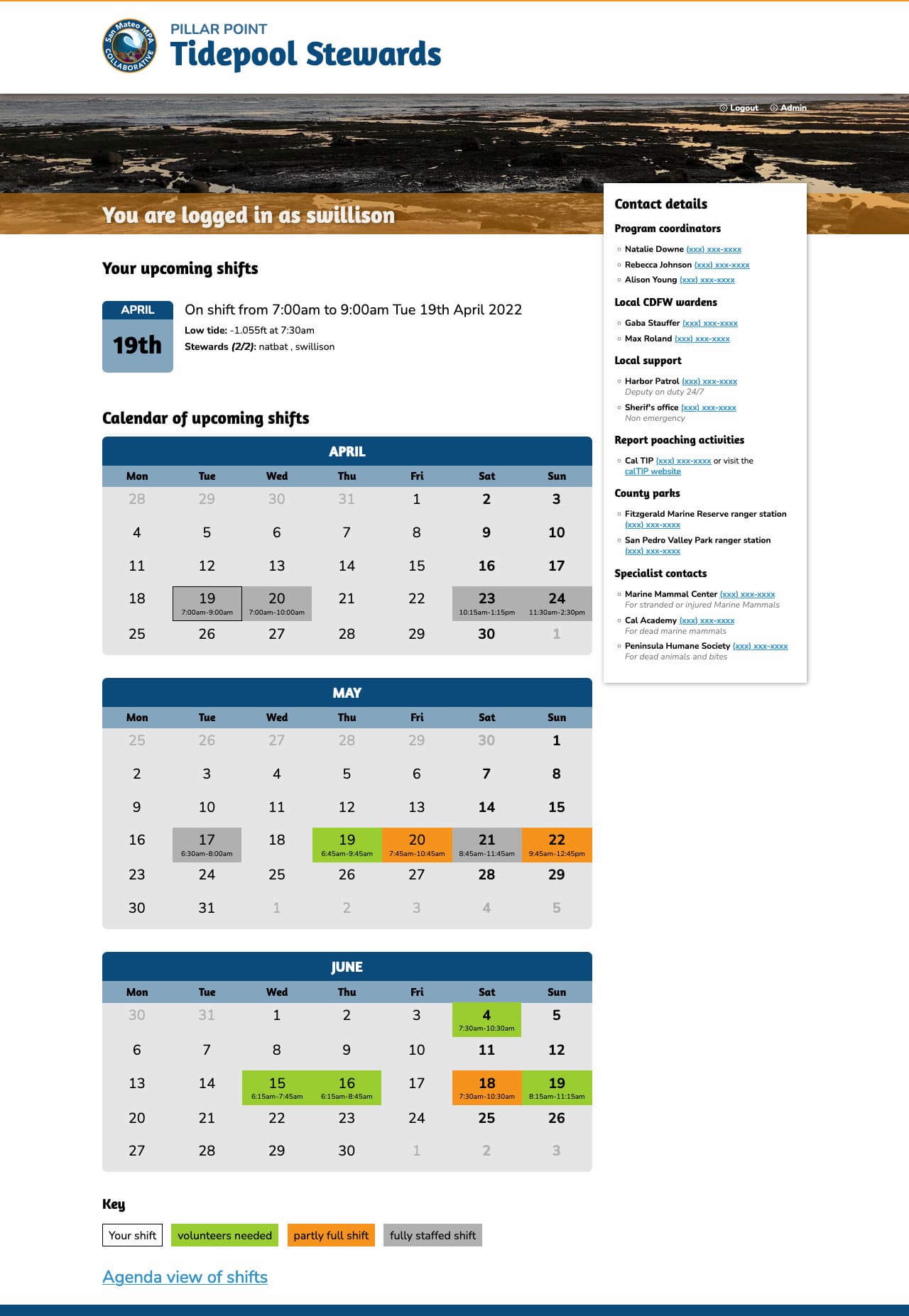
Signed in volunteers can select their shift times from a calendar:
We also included an SVG tide chart on each shift page using the tide data from NOAA, which looks like this:

We’ve been building the site in public. You can see how everything works in the natbat/pillarpointstewards GitHub repository, including how the site uses continuous deployment against Fly.
datasette-dashboards
This is not my project, but I’m writing about it here because I only just found out about it and it’s really cool.
Romain Clement built a plugin for Datasette called datasette-dashboards. It’s best explained by checking out his live demo, which looks like this:
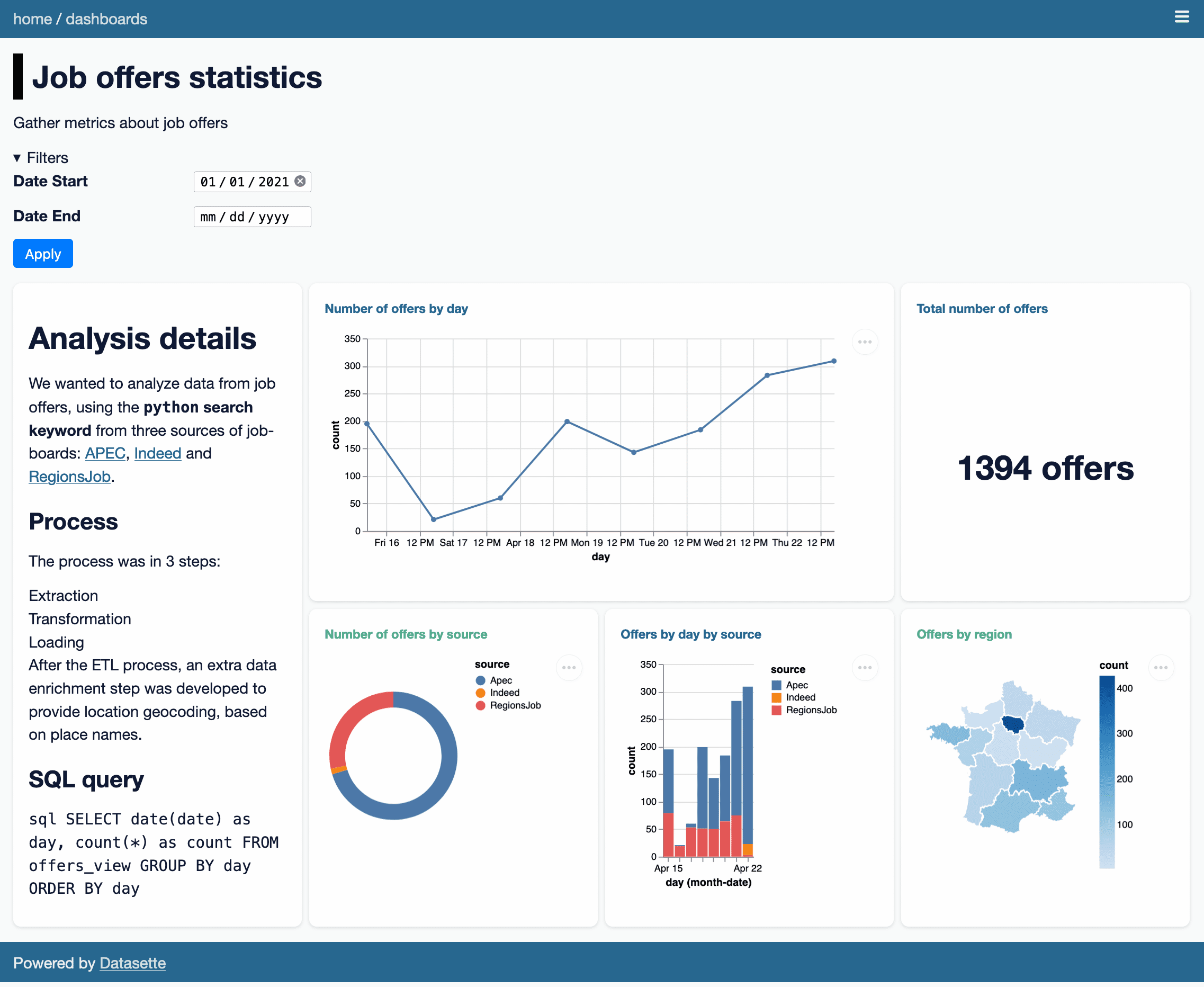
There are a bunch of clever ideas in this plugin.
It uses YAML syntax to define the different dashboard panels, outsourcing the actual visualization elements to Vega. You can see the YAML for the demo here. Here’s an edited subset of the YAML illustrating some interesting points:
plugins: datasette-dashboards: job-offers-stats: title: Job offers statisticsdescription: Gather metrics about job offerslayout: - [analysis-note, offers-day, offers-day, offers-count] - [analysis-note, offers-source, offers-day-source, offers-region]filters: date_start: name: Date Starttype: datedefault: '2021-01-01'date_end: name: Date Endtype: datecharts: analysis-note: library: markdowndisplay: |- # Analysis details ...offers-count: title: Total number of offersdb: jobsquery: SELECT count(*) as count FROM offers_view WHERE TRUE [[ AND date >= date(:date_start) ]] [[ AND date <= date(:date_end) ]];library: metricdisplay: field: countprefix: suffix: " offers"offers-day: title: Number of offers by daydb: jobsquery: SELECT date(date) as day, count(*) as count FROM offers_view WHERE TRUE [[ AND date >= date(:date_start) ]] [[ AND date <= date(:date_end) ]] GROUP BY day ORDER BY daylibrary: vegadisplay: mark: { type: line, tooltip: true }encoding: x: { field: day, type: temporal }y: { field: count, type: quantitative }The SQL query for each panel is defined as query:—and can take parameters such as :date_end which are defined by the filters: section. Note that here one of the filters has a type of date, which turns into a <input type="date"> in the filter interface.
For library: vega panels the display: key holds the raw Vega specification, so anything the Vega visualization library can do is available to the plugin.
I didn’t know Vega could render choropleth maps! That map there is defined by this YAML, which loads a GeoJSON file of the regions in France from the gregoiredavid/france-geojson GitHub repository.
display: mark: geoshapeprojection: { type: mercator }transform: - lookup: regionfrom: data: url: https://raw.githubusercontent.com/gregoiredavid/france-geojson/master/regions.geojsonformat: { type: json, property: features }key: properties.nomfields: [type, geometry]I think my favourite trick though is the way it handles layout. The layout for the demo is defined thus:
layout: - [analysis-note, offers-day, offers-day, offers-count] - [analysis-note, offers-source, offers-day-source, offers-region]This is then implemented using CSS grids! Here’s the template fragment that does the work:
<style>@media (min-width: 800px) {.dashboard-grid { {% ifdashboard.layout %}grid-template-areas: {% forrowindashboard.layout %}"{% forcolinrow %}{{ col }} {% endfor %}" {% endfor %}; {% else %}grid-template-columns: repeat(2, 1fr); {% endif %} } {% ifdashboard.layout %} {% forchart_slug, chartindashboard.charts.items() %}#card-{{ chart_slug }} {grid-area: {{ chart_slug }}; } {% endfor %} {% endif %} }</style>Such a clever and elegant trick.
pypi-to-sqlite
I wanted to add datasette-dashboards to the official Datasette plugins directory, but there was a catch: since most of the plugins listed there are written by me, the site has some baked in expectations: in particular, it expects that plugins will all be using the GitHub releases feature (for example) to announce their releases.
Romain’s plugin wasn’t using that feature, instead maintaining its own changelog file.
I’ve been meaning to make the plugin directory more forgiving for a while. I decided to switch from using GitHub releases as the definitive source of release information to using releases published to PyPI (the Python package index) instead.
PyPI offers a stable JSON API: https://pypi.org/pypi/datasette-dashboards/json—which includes information on the package and all of its releases.
To reliably pull that information into datasette.io I decided on a two-step process. First, I set up a Git scraper to archive the data that I cared about into a new repository called pypi-datasette-packages.
That repo stores the current PyPI JSON for every package listed on the Datasette website. This means I can see changes made to those files over time by browsing the commit history. It also means that if PyPI is unavailable I can still build and deploy the site.
Then I wrote a new tool called pypi-to-sqlite to load that data into SQLite database tables. You can try that out like so:
pip install pypi-to-sqlite pypi-to-sqlite pypi.db datasette-dashboards pypi-to-sqlite --prefix pypi_ That --prefix option causes the tables to be created with the specified prefix in their names.
Here are the three tables generated by that command:
Using data from these tables I was able to rework the SQL view that powers the plugins and tools directories on the site, and now datasette-dashboards has its own page there.
shot-scraper 0.10 and 0.11
shot-scraper is my tool for taking automated screenshots of web pages, built on top of Playwright.
Ben Welsh has been a key early adopter of shot-scraper, using it to power his news-homepages project which takes screenshots of various news websites and then both tweets the results and uploads them to the News Homepages collection on the Internet Archive.
shot-scraper 0.10 is mostly Ben’s work: he contributed both a --timeout option and a --browser option to let you install and use browsers other than the Chromium default!
(Ben needed this because some news homepages were embedding videos in a format that wasn’t supported by Chromium but did work fine in regular Chrome.)
Ryan Cheley also contributed to 0.10—thanks to Ryan, the shot-scraper multi command now continues taking shots even if one of them fails, unless you pass the --fail-on-error flag.
In writing my weeknotes, I decided to use shot-scraper to take a screenshot of the signed in homepage of the www.pillarpointstewards.com site.
In doing so, I found out that Google SSO refuses to work with the default Playwright Chromium! But it does continue to work with Firefox, so I fixed the shot-scraper auth to support the --browser option.
I took the screenshot like this:
shot-scraper auth https://www.pillarpointstewards.com/ -b firefox auth.json # Now manually sign in with Auth0 and Google shot-scraper https://www.pillarpointstewards.com/ -b firefox -a auth.json \ --javascript " Array.from( document.querySelectorAll('[href^=tel]') ).forEach(el => el.innerHTML ='(xxx) xxx-xxxx')" That --javascript line there redacts the phone numbers that are displayed on the page to signed in volunteers.
I created the second screenshot of just the tide times chart using this:
shot-scraper https://www.pillarpointstewards.com/shifts/182/ \ -b firefox -a auth.json \ --selector '.primary h2:nth-child(8)' \ --selector .day-alone --padding 15 shot-scraper 0.11, released a few minutes ago, contains the new auth --browser feature plus some additional contributions from Ben Welsh, Ryan Murphy and Ian Wootten:
- New
shot-scraper accessibility --timeoutoption, thanks Ben Welsh. #59shot-scraper auth --browseroption for authentication using a browser other than Chromium. #61- Using
--qualitynow results in a JPEG file with the correct.jpgextension. Thanks, Ian Wootten. #58- New
--reduced-motionflag for emulating the “prefers-reduced-motion” media feature. Thanks, Ryan Murphy. #49
Releases this week
- shot-scraper: 0.11—(12 releases total)—2022-04-08
Tools for taking automated screenshots of websites - pypi-to-sqlite: 0.2.2—(3 releases total)—2022-04-08
Load data about Python packages from PyPI into SQLite - shot-scraper: 0.10—(12 releases total)—2022-03-29
Tools for taking automated screenshots of websites
TIL this week
Weeknotes: datasette-auth014 days ago
Datasette 0.61, a Twitter Space and a new Datasette plugin for authenticating against Auth0.
datasette-auth0
I’ve been figuring out how best to integrate with Auth0 for account management and sign-in, for a project I’m working on with Natalie.
I used Auth0 for VIAL with Vaccinate CA last year, following the Auth0 Django tutorial using Python Social Auth.
This time I decided to try and do it from first principles rather than use a library, for reasons I discussed in this Twitter thread.
It turns out Auth0 is using regular OAuth 2, which can be implemented from scratch in just three steps:
- Generate a URL to a page on Auth0 that will display the login screen
- Implement a page that handles the redirect back from Auth0, which needs to exchange the code from the
?code=parameter for an access token by POSTing it to an authenticated API endpoint - Use that access token to retrieve the authenticated user’s profile
I wrote up the steps in this TIL: Simplest possible OAuth authentication with Auth0
Since it turned out to be pretty straight-forward, I turned it into a new authentication plugin for Datasette: datasette-auth0.
You can try that out with the live demo at datasette-auth0-demo.datasette.io—click on the top right menu icon and select “Sign in with Auth0”.
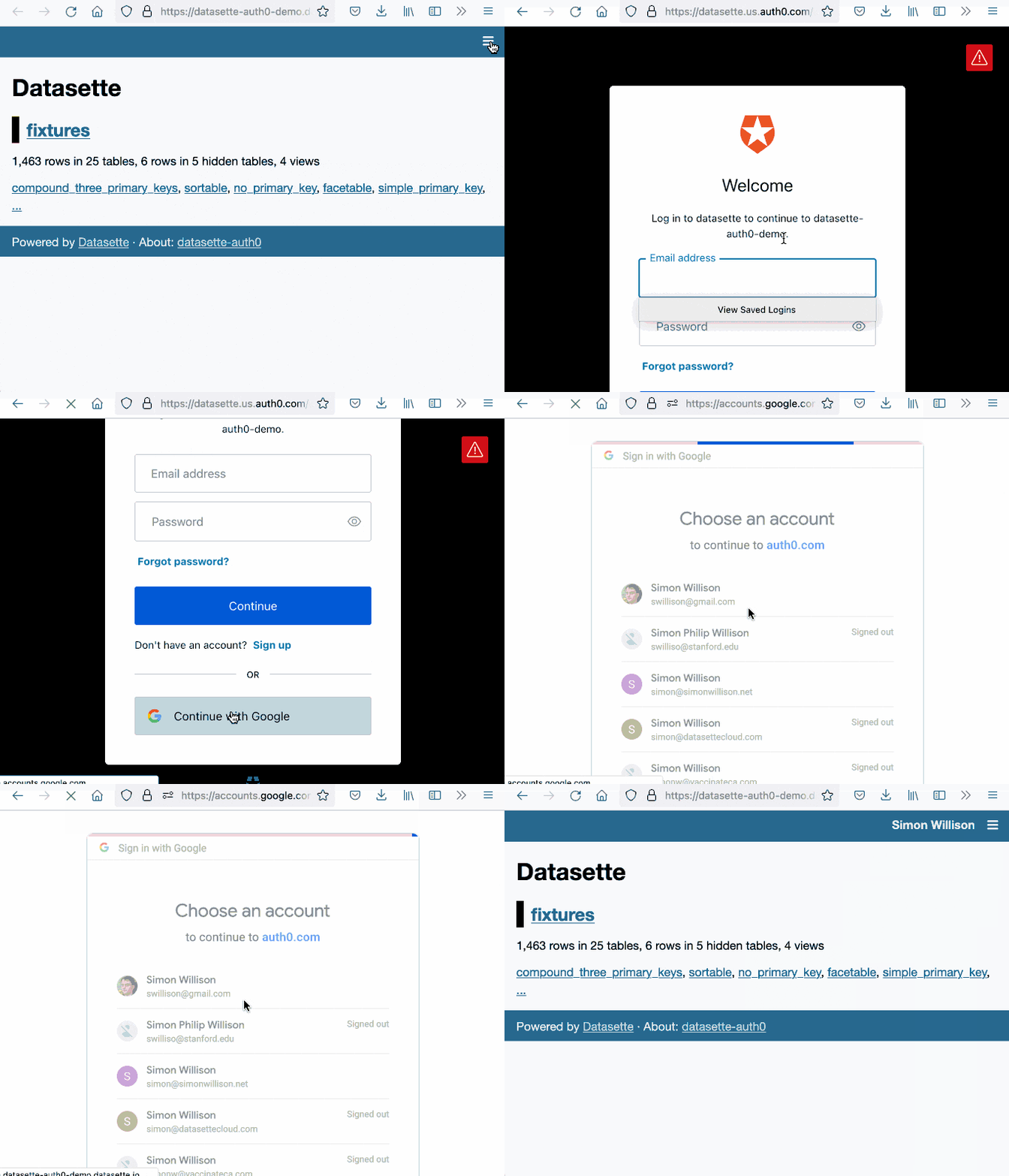
The live demo is deployed automatically any time a push to the main branch passes its tests. I’ve implemented this pattern a few times now, so I wrote it up in another TIL: Deploying a live Datasette demo when the tests pass.
Datasette 0.61.0 (and 0.61.1)
I wrote about these in the annotated weeknotes. They were pretty significant releases, representing 86 commits since 0.60.2 released back in January.
New features as documentation
Some of my favourite feature requests for my projects are ones that can be solved by documentation. I had a great example of that this week.
In #420: Transform command with shared context Mehmet Sukan wanted a way to speed up the following operation using sqlite-utils insert --convert—described in What’s new in sqlite-utils 3.20 and 3.21:
cat items.json | jq '.data'| sqlite-utils insert listings.db listings - --convert 'd = enchant.Dict("en_US")row["is_dictionary_word"] = d.check(row["name"])' --import=enchant --ignoreThe --convert option lets you specify Python code that will be executed against each inserted item. Mehmet’s problem was that the enchant.Dict("en_US") operation is quite expensive, and it was being run every time around the loop.
I started looking into ways to speed this up... and realized that there was already a mechanism for doing this, but it was undocumented and I hadn’t previously realized it was even possible!
The recipe that works looks like this:
echo'[ {"name": "notaword"}, {"name": "word"}]'| python3 -m sqlite_utils insert listings.db listings - --convert 'import enchantd = enchant.Dict("en_US")def convert(row): global d row["is_dictionary_word"] = d.check(row["name"])'The result:
% sqlite-utils rows listings.db listings [{"name": "notaword", "is_dictionary_word": 0}, {"name": "word", "is_dictionary_word": 1}]This takes advantage of a feature of the sqlite-utils Python snippet mechanism, which is implemented here. It first attempts exec() against the provided code to see if it defined a convert(value) function—if that fails, it composes a function body (to cover simple expressions like row["ok"] = True).
So I got to close the issue by adding some documentation showing how to do this!
Another, smaller example this week: when I figured out Extracting web page content using Readability.js and shot-scraper I learned that Playwright can accept and execute async () => {...} functions, enabling this pattern:
shot-scraper javascript https://simonwillison.net/2022/Mar/24/datasette-061/ "async () => { const readability = await import('https://cdn.skypack.dev/@mozilla/readability'); return (new readability.Readability(document)).parse();}"So I added that pattern to the shot-scraper documentation.
SQLite Happy Hour Twitter Space
I hosted my first Twitter Space. The recording and notes can be found in SQLite Happy Hour—a Twitter Spaces conversation about three interesting projects building on SQLite.
I also learned how to download the audio of a Twitter Spaces in two different ways, as documented in my TIL on Exporting and editing a Twitter Spaces recording.
Releases this week
- datasette-auth0: 0.1—2022-03-27
Datasette plugin that authenticates users using Auth0 - datasette-packages: 0.1.1—(2 releases total)—2022-03-25
Show a list of currently installed Python packages - datasette-hashed-urls: 0.4—(5 releases total)—2022-03-24
Optimize Datasette performance behind a caching proxy - datasette: 0.61.1—(110 releases total)—2022-03-23
An open source multi-tool for exploring and publishing data - datasette-publish-vercel: 0.13—(20 releases total)—2022-03-20
Datasette plugin for publishing data using Vercel
TIL this Weeknotes
- Async fixtures with pytest-asyncio
- The simplest recursive CTE
- Counting SQLite virtual machine operations
- Using the GitHub Actions cache with npx and no package.json
- Rewriting a repo to contain the history of just specific files
- Exporting and editing a Twitter Spaces recording
- Extracting web page content using Readability.js and shot-scraper
- Simplest possible OAuth authentication with Auth0
- Deploying a live Datasette demo when the tests pass
Datasette 0.61: The annotated release notes18 days ago
I released Datasette 0.61 this morning—closely followed by 0.61.1 to fix a minor bug. Here are the annotated release notes.
In preparation for Datasette 1.0, this release includes two potentially backwards-incompatible changes. Hashed URL mode has been moved to a separate plugin, and the way Datasette generates URLs to databases and tables with special characters in their name such as
/and.has changed.
- URLs within Datasette now use a different encoding scheme for tables or databases that include “special” characters outside of the range of
a-zA-Z0-9_-. This scheme is explained here: Tilde encoding. (#1657)- Removed hashed URL mode from Datasette. The new
datasette-hashed-urlsplugin can be used to achieve the same result, see datasette-hashed-urls for details. (#1661)
I talked about these changes in my weeknotes. These are two major steps forward towards Datasette 1.0, in that implementing them removed a lot of code and complexity from Datasette core.
Datasette also now requires Python 3.7 or higher.
0.60 was the final release to work with Python 3.6, which ended security support last December.
- Databases can now have a custom path within the Datasette instance that is independent of the database name, using the
db.routeproperty. (#1668)
This was the last change I made before the 0.61 release, and turned out to have a severe bug which prompted me to release 0.61.1 shortly afterwards.
I needed the feature in order to implement the datasette-hashed-urls plugin.
That plugin works by modifying the URL relating to a database in order to incorporate the SHA-256 hash of that database’s contents. This allows all JSON and HTML pages within that database to set a far-future cache header, providing a huge performance boost especially if run behind a caching proxy such as Cloudflare.
Initially it worked by changing the display name of the database too, but Forest Gregg pointed out that exposing all of those hashes in the UI was a pretty poor user experience.
So I decided to split the “route” (the URL to the database—“path” was already in use as the path to the file on disk) from the unique name used to refer to the database internally.
I caught almost all of the places in the code that needed to be updated, but shortly after shipping 0.61 I noticed that Forest had filed issues relating to the one place I had missed!
Those fixes are out now, and datasette-hashed-urls 0.3 should work as advertised.
- Datasette is now covered by a Code of Conduct. (#1654)
It’s good open source governance to have one of these. I decided to adopt the Contributor Covenant because it reflected my own values for the project and is used by a large number of projects that I trust.
I didn’t test Datasette against Python 3.10 before it came out and was distressed to find an asyncio bug that caused errors with the project after that version of Python was released!
I’m not going to let that happen again, so Datasette’s test suite now runs against the 3.11 developer preview. Here’s my TIL about how I set that up.
- New datasette.ensure_permissions(actor, permissions) internal method for checking multiple permissions at once. (#1675)
- New datasette.check_visibility(actor, action, resource=None) internal method for checking if a user can see a resource that would otherwise be invisible to unauthenticated users. (#1678)
These two new permissions APIs came out of a larger effort to refactor and simplify Datasette’s core views.
Datasette’s BaseView class included permission logic. I’m trying to shrink that superclass down to the point where I can remove it entirely, and I also wanted to make that permission logic available to plugins as well. Moving those methods into the documented Datasette class felt like a good way to achieve that.
- Table and row HTML pages now include a
<link rel="alternate" type="application/json+datasette" href="...">element and return aLink: URL; rel="alternate"; type="application/json+datasette"HTTP header pointing to the JSON version of those pages. (#1533)Access-Control-Expose-Headers: Linkis now added to the CORS headers, allowing remote JavaScript to access that header.
The idea behind this change originated with my experimental work on the datasette-notebook plugin, which aims to implement a combination wiki-dashboard system for Datasette. Development of that plugin is stalled for the moment.
I wanted to build a feature where you could paste in a URL to a Datasette query or filtered table and the plugin would then embed and display the results of that query on a page.
To support this, I built an experimental Web Component, datasette-table, and published it to npm (TIL).
The problem I needed to solve was this: given a URL, how can I tell that it corresponds to a Datasette table or query? Especially if that URL might be hosted on a separate website entirely (why not support embedding Datasette tables from other instances?)
My solution was an HTTP header. You can now make a HEAD request against a Datasette page and, if it corresponds to a table or view, you’ll get back a Link: ... rel="alternate" header pointing to the JSON version of that page.
Here’s an example using curl:
~ % curl -I https://latest.datasette.io/fixtures/facetable HTTP/2 200 link: https://latest.datasette.io/fixtures/facetable.json; rel="alternate"; type="application/json+datasette" cache-control: max-age=5 referrer-policy: no-referrer access-control-allow-origin: * access-control-allow-headers: Authorization access-control-expose-headers: Link content-type: text/html; charset=utf-8 I’m looking forward to building interesting features against this in the future.
- Canned queries are now shown at the top of the database page, directly below the SQL editor. Previously they were shown at the bottom, below the list of tables. (#1612)
Jacob Fenton suggested this. Canned queries were previously listed at the very bottom of the database page, below the list of tables. They’re now shown at the top. I think this is a big improvement!
- Datasette now has a default favicon. (#1603)
I originally created this in Figma, and then hand-edited it in Pixelmator.
SQLite and SpatiaLite occasionally use automatically created tables to power some of their functionality. These aren’t very interesting to regular users, so Datasette omits them from view by default on the homepage.
I have an open issue for Labels explaining what hidden tables are for since the current UI leads to legitimate questions from users who click on the “show hidden tables” link!
- SQL query tracing mechanism now works for queries executed in
asynciosub-tasks, such as those created byasyncio.gather(). (#1576)- datasette.tracer mechanism is now documented.
This was the impetus for dropping support for Python 3.6.
The tracer mechanism powers the debugging feature that shows all of the SQL queries that were executed to produce a page (demo here).
I’ve been experimenting with ways to run some of these queries in parallel, taking advantage of asyncio. But the tracer mechanism wasn’t correctly tracking these, because queries executed in additional asyncio tasks were not being correctly bundled together.
The Python standard library contextvars module provides a neat way to solve this, but it was introduced in Python 3.7. So I finally bit the bullet and dropped 3.6.
- Common Datasette symbols can now be imported directly from the top-level
datasettepackage, see Import shortcuts. Those symbols areResponse,Forbidden,NotFound,hookimpl,actor_matches_allow. (#957)
This means plugins can now do from datasette import Response, where previously they had to use from datasette.utils.asgi import Response.
I’ve long been frustrated that Django makes me remember where to import things from—so now Datasette lets the most commonly imported stuff (counted by running grep against my own plugins) from the root of the package.
/-/versionspage now returns additional details for libraries used by SpatiaLite. (#1607)
You can see a demo of that here.
- Documentation now links to the Datasette Tutorials.
I wrote about these new tutorials a few weeks ago.
And the rest:
- Datasette will now also look for SpatiaLite in
/opt/homebrew—thanks, Dan Peterson. (#1649)- Fixed bug where custom pages did not work on Windows. Thanks, Robert Christie. (#1545)
- Fixed error caused when a table had a column named
n. (#1228)
SQLite Happy Hour—a Twitter Spaces conversation about three interesting projects building on SQLite18 days ago
Yesterday I hosted SQLite Happy Hour. my first conversation using Twitter Spaces. The idea was to dig into three different projects that were doing interesting things on top of SQLite. I think it worked pretty well, and I’m curious to explore this format more in the future.
Here’s the tweet that initially promoted the space:
Interested in devious tricks to push the envelope of what you can do with SQLite?
- Simon Willison (@simonw) March 17, 2022
Join myself, @benbjohnson, @geoffreylitt and @nschiefer on Tuesday for a Twitter Spaces conversation about @litestream, @datasetteproj and Riffle!https://t.co/ukRMVgC09u
My co-hosts, representing the three projects, were:
- Ben Johnson @benbjohnson, creator of Litestream—a tool that adds replication to SQLite built on top of the WAL mechanism.
- Geoffrey Litt @hgeoffreylitt and Nicholas Schiefer @nschiefer who are working on Riffle, a project exploring the idea of driving reactive user interfaces using SQL queries—see Building data-centric apps with a reactive relational database.
Twitter Spaces recorded audio only lasts for 30 days, so I’ve exported the audio and shared it on SoundCloud as well.
Collaborative notes from the session
Something I’ve observed in Twitter Spaces I’ve joined in the past is that they can really benefit from a dedicated back-channel, to share links and allow audience participation without people needing to first request to speak.
A trick I’ve used with online talks I’ve given in the past is to start a collaborative Google Doc to collect shared notes and questions. I tried this for the Twitter Space, and it worked really well!
You see that document here. During the session the document was open for anyone to edit—I’ve locked it down now that the session has ended.
I’ve duplicated the final form of the document at the bottom of this post.
Something I really like about this format is that it allows for additional material to be posted later. I spent some time adding more detailed answers to the questions about Datasette after the session had ended.
Thoughts for if I do this again
This was my first time hosting a space, and I learned a lot along the way.
Firstly, this kind of thing works the best when there is a back and forth between the participants.
My original idea was to have each project talk for ten minutes, then spend five minutes on discussion between the panel before moving on to the next project—and 15 minutes of open discussion at the end.
My co-hosts suggested we try to make it more conversational, interrupting each other as we went along. We did that, and it worked much better: these conversations are far more interesting as a conversation than a monolog.
I still don’t have a great feel for when to interrupt people in an audio-only conversation, since unlike an in-person panel there are no visual clues to go off!
Techology: it turns out Twitter Spaces has wildly different functionality on web v.s. mobile apps. We spent the first five minutes making sure all of our speakers could talk! We really should have done a tech rehearsal first, but I wasn’t sure how to do that without accidentally broadcasting it to the world—maybe setup burner Twitter accounts for testing?
Presenting audio-only is itself a challenge: I’m used to leaning on visual demos when I explain what Datasette is in a talk, and not having those to fall back on was challenging. I had jotted down notes on the main points I wanted to hit which certainly helped, but I think there’s a whole new presenting skill here that I need to work harder to develop.
Exporting the recorded audio from Twitter was frustrating but possible. I wrote some notes on how I did that in this TIL.
Our collaborative notes in full
SQLite Happy Hour Twitter Space
22nd March 2022—12:30pm PT / 1:30pm MT / 3:30pm ET
Welcome to the SQLite Happy Hour! This hour-long session will feature three projects that are doing interesting things with SQLite. Each project will provide a ten minute overview, followed by five minutes of discussion from the panel. The last 15 minutes of the hour will be an open discussion and general Q&A.
This document is open for anyone to edit. Please feel free to drop notes and questions in as we go along.
The recording of the space is available here: https://twitter.com/i/spaces/1ypKdEXvkMLGW
Riffle
Geoffrey Litt @geoffreylitt, Nicholas Schiefer @nschiefer
Riffle asks: what if you wrote your whole UI as a query over a local database? So far, we’ve built a prototype using SQLite and React. More background in this paper:
Building data-centric apps with a reactive relational database
Research project goal is to make development simpler, as opposed to the ongoing trend of more complexity.
Riffle looks at having a database-centric mechanism at the heart of the view. Declarative queries could make apps easier to understand and debug.
SQLite is the tool used for the prototype.
Local first architecture: Ink & Switch have been promoting this. Return to a world where you local client device serves as a source of truth—you can access data offline etc—and when the network is available your data gets synced to the cloud.
The prototype: a reactive layer that uses SQLite as a state management backend for React, using https://sql.js.org/ which compiles SQLite in WASM. Also built prototypes of desktop apps using https://github.com/tauri-apps/tauri—like Electron but using the system web browser instead of bundling its own.
Since they control the writes, they can re-execute every query after any writes happen. SQLite is so fast that this works fine, queries all take under a ms and even with a thousand queries you can still run them all.
ALL UI state is in the database—there’s no local React component state—literally everything is in the database. This means all UI state is persistent by default.
IndexedDB is used for the in-browser persistence. The Tauri desktop app stores to a file on disk. Maybe SQL.js could do that with the new Chrome filesystem API stuff too?
Questions about Riffle:
Will Riffle target vanilla JS, or Node.js?
- It’s running client-side, so vanilla JS
From Stephen: What about browser-native UI state like scroll position, URL path, query string, multiple independent browser tabs, etc?
- Great question. We do some syncing of browser-native state to put it in the DB: eg, to support virtualized list rendering we update scroll state in the DB with an event handler. But there’s definitely some browser state that isn’t being captured reliably. In the purest world, the pixels on your screen would be produced by a DB query :)
From Predrag Gruevski: Would “query the queries” be a viable approach for narrowing the set of queries that need to be re-executed after a given write? Simple example: if table X gets modified, query for all queries that have table X in a FROM clause, then re-execute them.
- yeah, that’s roughly the direction we’re headed. It’s a little trickier than that if you start having subqueries / materialized view, but good general idea
From Longwei Su: Right now, each db update will cause a whole refresh. Is there any plan to refine the binding? So that any db update will only trigger UI component that “subscribe” to this section of the data. Sqlite have trigger, which can have callback on record update. How to construct that “publisher”-> “subscriber” mapping from sql query?
Comments for Riffle:
From Jesse—http://web.dev/file-system-access/ isn’t a very rich api—I think you could persist to it, but I don’t think you can seek/update/.../all the posix stuff sqlite probably needs
Hasura documented how they do reactive queries with Postgres, might be useful for minimising refetch overhead?
Datasette
Simon Willison @simonw
Datasette is an open source multi-tool for exploring and publishing data. It explores SQLite as a read-only mechanism for publishing structured data online in as flexible a manner as possible, and aims to build an ecosystem of plugins that can handle a wide range of exploratory data analysis challenges.
Video introduction here: https://simonwillison.net/2021/Feb/7/video/
Questions about Datasette:
How does it compares with https://github.com/dinedal/textql, it seems the same but instead of sqlite binaries, just raw csv files which are more ubiquitous, and easier to view and edit with with office software (msf excel, libreoffice calc) ?
- sqlite-utils memory provides similar functionality: https://simonwillison.net/2021/Jun/19/sqlite-utils-memory/
Does Datasette need to worry about SQLite’s Defense Against the Dark Arts security guidelines?
- Yes, absolutely! I’ve put a lot of work in there. Most importantly, Datasette enforces a time limit on queries, which cuts them off if they take more than a second.
The SQLite3 docs are sometimes light on examples for the tricky stuff (e.g., enabling WAL). What’s your best sort of info beyond the official docs?
- I’ve been publishing my own notes here: https://til.simonwillison.net/sqlite
- The SQLite Forum is amazing—I ask questions on there and often get a reply from the maintainers within a few hours: https://sqlite.org/forum/forummain
From Predrag Gruevski: Regarding learning curve, is a GraphQL web IDE (with syntax highlighting / autocomplete etc.) sufficiently user-friendly for folks more comfortable with a spreadsheet than a CLI tool or SQL?
- Probably not! GraphQL requires thinking like a programmer too. I’m interested in helping people who aren’t yet ready to learn any kind of programming language
- I have a plugin for Datasette that adds GraphQL with the GraphiQL user interface—demo here: datasette-graphql-demo.datasette.io
- Thanks! Would love to compare notes on this -- my experience from working with analysts at my employer was that they were able to master GraphiQL very quickly. In a sense, it was more intimidating than actually difficult, so working with them directly to get them over the initial difficulty hump via examples and targeted exercises made a huge positive impact.
Litestream
Ben Johnson @benbjohnson
Litestream adds replication to SQLite, allowing databases to be cheaply replicated to storage systems such as S3. Litestream also now implements live read-replication, where many read replicas can be run against a single leader database.
https://www.sqlite.org/np1queryprob.html—Many Small Queries Are Efficient in SQLite
Questions about Litestream:
What does the planned hot standby feature look like, especially regarding durability guarantees during fail-over?
- BJ: Hot standby is a tough issue to generalize. The database-as-a-service version of Litestream that’s coming will handle this but it’s not necessarily planned for Litestream)
Will DBaaS be hosted, OSS, or both?
- It’ll be both
From Longwei Su: I assume offline update will be commit locally then sync with the online storage. If there is a offline commit that conflict with the online version(that already committed in). How to resolve the conflict?
Not sure if this relates to Litestream but; how big is sql.js --- how much does it cost (in kilobytes) to load sqlite in the browser?
- BJ: I think sql.js is 1.2MB so the cost depends on how much your provider charges for bandwidth
- Thanks! Meant “cost” in the sense of bytes transferred over wire --- this answers it :)
GraphQL
- https://github.com/simonw/help-scraper is scraping GraphQL schemas
Weeknotes: Tildes not dashes, and the big refactor23 days ago
After last week’s shot-scraper distractions with Playwright, this week I finally managed to make some concrete progress on the path towards Datasette 1.0.
shot-scraper for scraping, and GitHub template repository hacks
I did invest some time in shot-scraper this week, which I wrote about on this blog in detail earlier:
- Scraping web pages from the command line with shot-scraper describes the new
shot-scraper javascript URL scriptcommand, which lets you fire up a web page in a headless browser, execute some custom JavaScript against it to extract information and return that information as JSON to the command-line. This is a really cool trick! It turnsshot-scraperinto more than just a screenshotting tool: it now doubles up as the command line scraping tool I’ve been wanting for years. - Instantly create a GitHub repository to take screenshots of a web page describes shot-scraper-template—a GitHub repository template I created that lets people easily create a new repository that takes screenshots of a web page using
shot-scraperrunning in GitHub Actions.
That GitHub repository trick really took off. Searching for shot-scraper-template -user:simonw path:.github/workflows on GitHub now returns 50 repositories that people other-than-me have created using the template!
It also caused me to revisit my template repositories for generating Python Click apps, Python libraries and Datasette plugins: all three of those now use a new pattern which avoids the user having to manually rename a folder in order to enable the GitHub Actions workflows—details here.
The big refactor, finally under way
The remaining work to do for Datasette 1.0 concerns stability. I want to make sure the JSON API and the plugin hooks are in a state where I can keep them stable until Datasette 2.0—which with any luck won’t ever need to happen.
I intend 1.0 as a promise that Datasette is a rock-solid foundation on which people can build build their own APIs, sites and plugins.
This also means I need to refactor some of the cruft. Work on the 1.0 API has been held up because it depends on some of the most complex code in the system, some of which has evolved in some pretty ugly ways over the past few years.
The two most covoluted aspects of Datasette’s codebase dealt with the following:
- Handling the difference between
/database/t1.jsonwhere the table is calledt1and/database/t1.jsonwhere the table is calledt1.json(a valid SQLite table name)—and handling database tables with/as part of their name. I wrote more about that when I described dash encoding. - Hashed URL mode—an optional performance optimization where Datasette rewrites the URLs to a database to incorporate part of the SHA-256 hash of the database contents, so it can use far-future cache expire headers.
This week, I solved both of these!
Tilde encoding, not dash encoding
In Why I invented “dash encoding”, a new encoding scheme for URL paths I confidently described a new approach to encoding values in a URL, based on the unfortunate fact that it turns out URL encoding in the path of a URL can’t be used reliably due to long-standing unfixable bugs in a large number of widely used reverse proxies.
My original dash encoding scheme worked like this:
/foo/barencoded to-/foo-/bartable.csvencoded totable-.csvfoo-barencoded tofoo--bar
Then I hit a huge problem with it: this encoding scheme does nothing special with the % character. But... it turns out the % character can’t be relied on in a URL since there’s a chance it may be mangled by one of the afore-mentioned misbehaving proxies.
Using -% doesn’t help because that still has an unsafe percent character in it.
Then glyph suggested this:
Have you considered replacing % with some other character and then using percent-encoding?
So I invented dash encoding v2, which worked exactly the same as URL percentage encoding but used the - character instead of the %.
/foo/barencodes to-2Ffoo-2Fbar-/db-/table.csvencodes to-2D-2Fdb-2D-2Ftable-2Ecsv
I was pretty confident this would work... until I started rolling out the new Datasette main branch to some of my deployed Datasette instances. That’s when I realized that - is a VERY common character in existing installations, and escaping it was actually pretty ugly.
The Datasette website uses a database called dogsheep-index—this got renamed to dogsheep-2Findex, which broke the search page.
More importantly, replacing - in a name with -2F is just really ugly. Surely I can do better than that?
I consulted the URI RFC and was delighted to find this list of unreserved characters:
unreserved = ALPHA / DIGIT / "-" / "." / "_" / "~" And so Tilde encoding was born! Same exact idea: percent encoding, but use a different character. In this case ~.
dogsheep-betaencodes todogsheep-beta/foo/barencodes to~2Ffoo~2Fbar-/db-/table.csvencodes to-~2Fdb-~2Ftable~2Ecsv
This works great. It doesn’t require encoding hyphens, so it results in prettier URLs. So it’s now implemented on Datasette main, ready for the next release.
Removing Hashed URL mode
I wrote about this three years ago as one of the interesting ideas in Datasette. The key idea was inspired by CSS and JavaScript asset rewriting: if your database never changes, you can rewrite the JSON URLs to /database-c9e67c4 and send far-future cache expiry headers with every response, caching them in both browsers and CDNs.
I liked the idea so much I made Datasette do it by default!
In Datasette 0.28 I changed my mind. Datasette grew the option to serve databases that could change while the server was running, at which point that optimization stopped making sense. I made it an option, controlled by a new hash_urls setting.
A couple of years later, I realized I hadn’t chosen to use that option myself in any of my own projects. I’d also really started to grate at the additional complexity the feature brought to the codebase.
I set myself a task to reconsider it before 1.0. This week, I found what I think is the right solution: I extracted the functionality out into a separate plugin, datasette-hashed-urls.
The key to building the plugin was realizing that, if the database is immutable, I can handle the URL rewriting simply by renaming the database to include its hash when the server first starts up.
The rest of the plugin implementation then handles redirects, for if the database has changed its contents and the old hash URLs need to be redirected to the new one.
Having built the plugin, I removed the implementation from core in issue 1661. This resulted in some sizable, satisfying code deletion, further convincing me that this was the right decision for the project.
Creeping closer to 1.0
If you want to follow the progress towards the first stable release,the Datasette 1.0 milestone is the place to look.
I’m determined to make significant progress this month, with the goal of shipping an alpha before March turns into April.
Releases this week
- datasette-hashed-urls: 0.2—(2 releases total)—2022-03-16
Optimize Datasette performance behind a caching proxy - datasette-publish-vercel: 0.12.1—(19 releases total)—2022-03-15
Datasette plugin for publishing data using Vercel - shot-scraper: 0.9—(10 releases total)—2022-03-14
Tools for taking automated screenshots of websites
TIL this week
Instantly create a GitHub repository to take screenshots of a web page28 days ago
I just released shot-scraper-template, a GitHub repository template that helps you start taking automated screenshots of a web page by filling out a form.
shot-scraper is my command line tool for taking screenshots of web pages and scraping data from them using JavaScript.
One of its uses is to help create and maintain screenshots for documentation, making it easy to update them to include changes to the design of the underlying pages.
To make this as easy as possible, I’ve created a GitHub repository template that automates the process of setting up shot-scraper to run against a URL.
To try it out, start here:
https://github.com/simonw/shot-scraper-template/generate
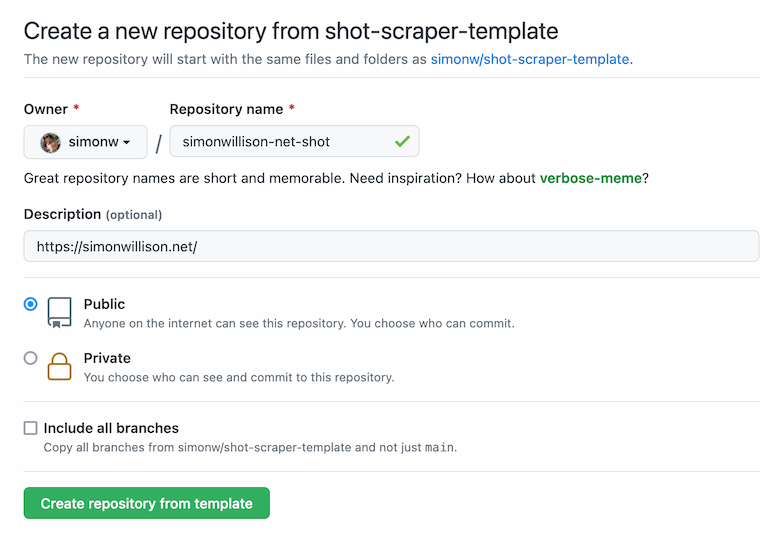
Pick a name for your new repository and paste the URL of the page you want to screenshot into the description field.
Then click “Create repository from template”.
That’s it! Your new repository will be created, a GitHub Actions automation script will run for a few seconds and your new screenshot will be added to the repository as a file called shot.png.
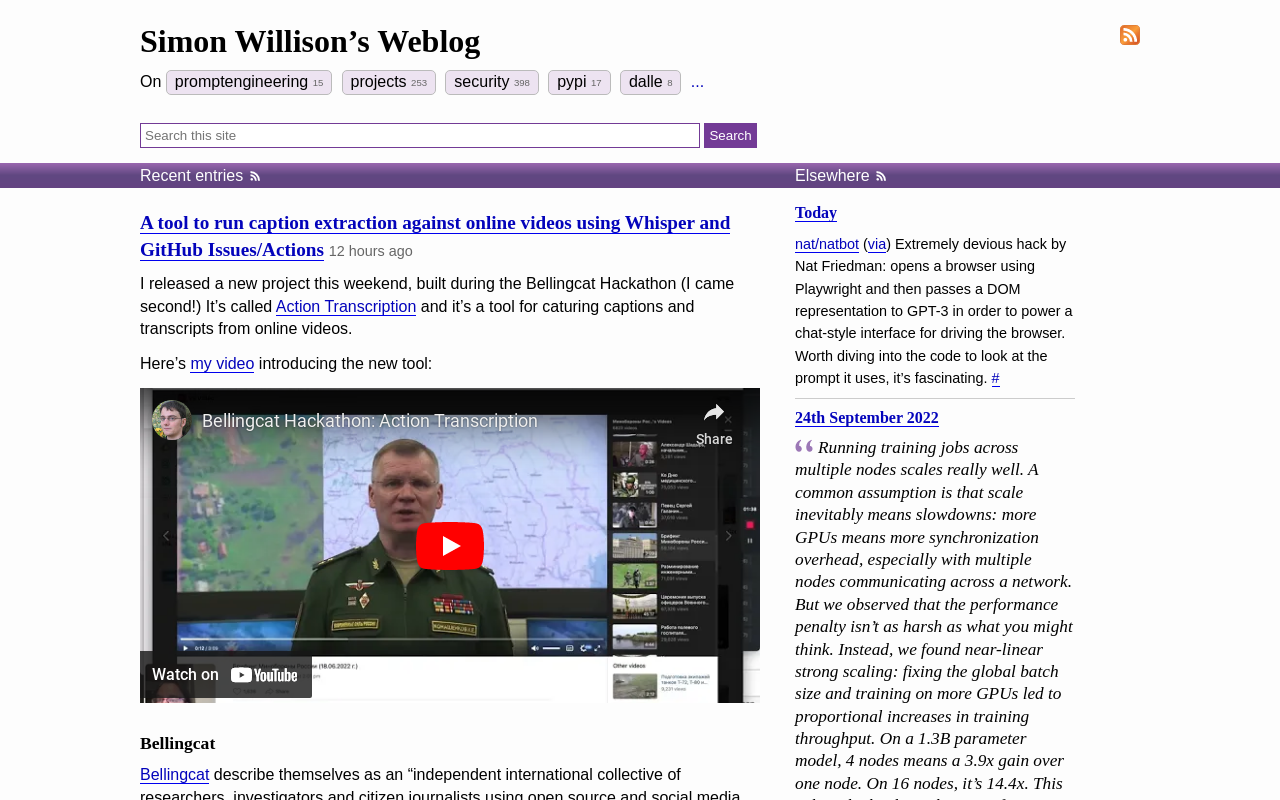
Here’s an example repository I created using the template: simonw/simonwillison-net-shot—and here’s the shot.png file from that repo:
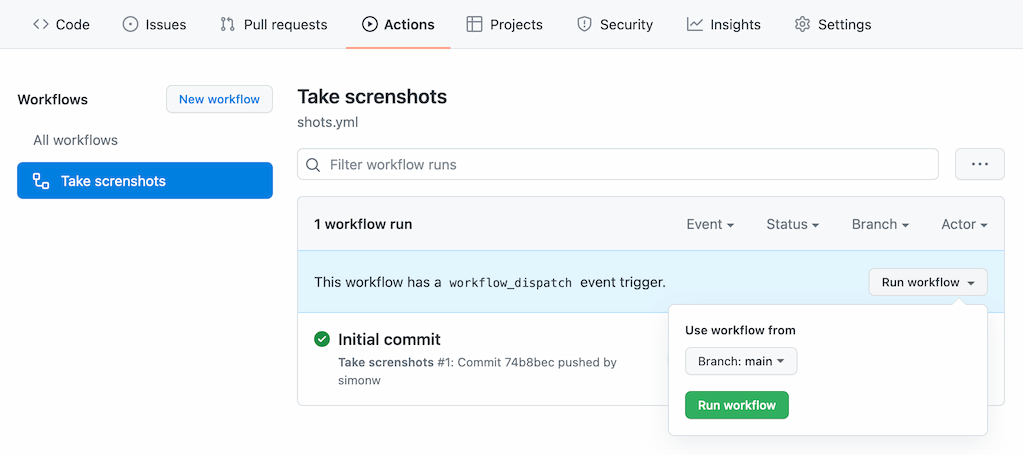
You can re-take the screenshot any time you want by clicking the “Run workflow” button in the Actions tab:
Your repository will have a file in it called shots.yml that initially looks like this:
- url: https://simonwillison.net/output: shot.pngheight: 800You can edit that file to change the settings that apply to your screenshot, or to add further URLs to take shots of like this:
- url: https://simonwillison.net/output: shot.pngheight: 800 - url: https://www.example.com/output: example.pngheight: 800Further options are available here, as described in the shot-scraper README.
How this works
This entire system is based around a single GitHub Actions workflow, in .github/workflows/shots.yml.
Here’s an annotated copy of that workflow showing how it all works.
name: Take screnshotson: push: workflow_dispatch:The workflow triggers when a change is made to the repository (including edits to the shots.yml file) or when the user manually clicks “Run workflow”.
jobs: shot-scraper: runs-on: ubuntu-latestif: ${{ github.repository !='simonw/shot-scraper-template' }}This is the trick that makes everything else work, which I picked up from Bruno Rocha last year. It ensures that this workflow job only runs on copies of the template, not on the initial template repository itself.
This is necessary because a later step creates a file in the repository if it doesn’t yet exist based on the description URL provided by the user.
steps: - uses: actions/checkout@v2 - name: Set up Python 3.10uses: actions/setup-python@v2with: python-version: "3.10" - uses: actions/cache@v2name: Configure pip cachingwith: path: ~/.cache/pipkey: ${{ runner.os }}-pip-${{ hashFiles('requirements.txt') }}restore-keys: | ${{ runner.os }}-pip-This is boilerplate that I use in most of my GitHub Actions workflows: it sets up Python 3.10, and also configures a cache such that Python requirements in a requirements.txt file persist from one invocation to another without having to be re-downloaded from PyPI.
- name: Cache Playwright browsersuses: actions/cache@v2with: path: ~/.cache/ms-playwright/key: ${{ runner.os }}-browsersshot-scraper uses Microsoft’s open source Playwright browser automation tool. Playwright works by installing its own full Chromium browser. This line configures a cache for that browser, such that future invocations of the Action don’t need to download another copy.
- name: Install dependenciesrun: | pip install -r requirements.txt - name: Install Playwright dependenciesrun: | shot-scraper installThe pip install line here installs the shot-scraper CLI tool, which is written in Python.
That shot-scraper install line then triggers the Playwright mechanism to download and install the browser. This will do nothing if the browser has already been cached.
- uses: actions/github-script@v6name: Create shots.yml if missing on first runwith: script: | const fs = require('fs'); if (!fs.existsSync('shots.yml')) { const desc = context.payload.repository.description; let line =''; if (desc && (desc.startsWith('http://') || desc.startsWith('https://'))) { line = `- url: ${desc}` + '\n output: shot.png\n height: 800'; } else { line ='# - url: https://www.example.com/\n# output: shot.png\n# height: 800'; } fs.writeFileSync('shots.yml', line + '\n'); }This is the other key piece of magic. This uses GitHub’s github-script action, which provides a Node.js environment with a context object containing details about the actions run.
It starts by reading the repository description from context.payload.repository.description.
Then it creates a shots.yml file based on that description—but only if the file does not exist already.
If there’s no repository description it creates one with a commented-out configuration instead, that looks like this:
# - url: https://www.example.com/# output: shot.png# height: 800The next step is to take the screenshots:
- name: Take shotsrun: | shot-scraper multi shots.ymlshot-scraper multi is documented here—it runs through the YAML file and takes each of the screenshots configured there in turn.
Final step is to commit and push the new shots.yml and shot.png files to the repository:
- name: Commit and pushrun: |- git config user.name "Automated" git config user.email "[email protected]" git add -A timestamp=$(date -u) git commit -m "${timestamp}" || exit 0 git pull --rebase git pushThis uses a pattern I describe in this TIL.
GitHub Actions as a platform
I tweeted this the other day, shortly before I came up with the idea for the shot-scraper-template repository.
Genuinely think GitHub Actions might be my favourite serverless platform right now
- Simon Willison (@simonw) March 13, 2022
This project demonstrates why. The amount of complex moving parts involved in shot-scraper-template is pretty bewildering, but the end result is a free tool that anyone can use to start taking automated screenshots.
And it doesn’t cost me anything to provide the tool either!